
This guide walks through the complete process, from starting a transaction to verifying it after it's has been submitted.
Before You Begin
Before sending or receiving cryptocurrency:
- Verify you're using the correct blockchain network.
- Ensure you have enough funds to cover any applicable network fees.
- Double-check wallet addresses before confirming a transaction.
- Remember that blockchain transactions generally cannot be reversed once confirmed.
How to Send Crypto
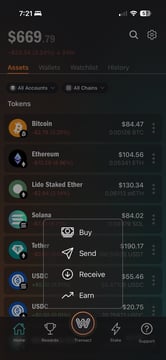
Step 1: Open the Transact Menu
From the home screen, tap Transact in the bottom navigation.
Select Send.
Step 2: Choose the Account to Send From
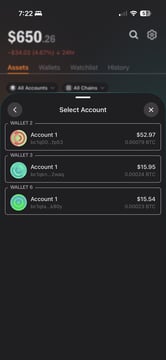
If you have multiple wallets or accounts:
- Select the account you'd like to send from.
- Each account has its own address and balance.
- Confirm the account has enough funds for both the transfer amount and any applicable network fees.
You can switch accounts any time before confirming the transaction.
Step 3: Select the Asset
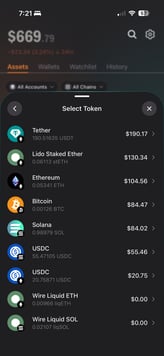
Choose the cryptocurrency you'd like to send.
Depending on supported networks, this may include assets such as:
- Bitcoin (BTC)
- Ethereum (ETH)
- Solana (SOL)
- USDC
- USDT
- Other supported assets
Only assets supported on the selected blockchain network will appear.
Step 4: Enter the Amount
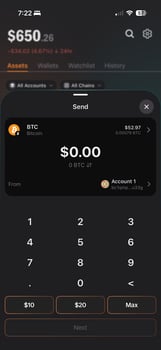
Enter the amount you'd like to send.
You can:
- Enter a custom amount.
- Use available quick amount shortcuts (if available).
- Choose Max to send the maximum available balance.
WireUp displays both the cryptocurrency amount and its estimated fiat equivalent.
Estimated network fees are included before you continue so you can review the total transaction cost.
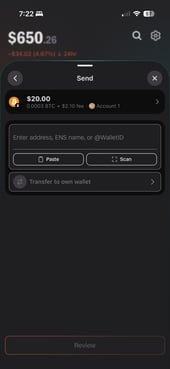
Step 5: Enter the Recipient Address
Choose where you'd like to send your assets.
You can:
- Paste a wallet address.
- Scan a QR code.
- Enter a supported name or identifier (when available).
- Transfer assets between your own wallets.
Before continuing, always verify:
- The wallet address is correct.
- The blockchain network matches the asset.
- The recipient supports that network.
⚠️ Important: Blockchain transactions are generally permanent and cannot be reversed once confirmed.
Step 6: Review the Transaction
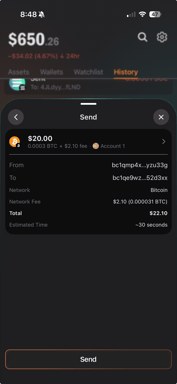
Before submitting your transaction, WireUp displays a summary including:
- Sending account
- Recipient address
- Blockchain network
- Asset and amount
- Estimated network fee
- Total transaction cost
- Estimated confirmation time
Take a moment to carefully review each detail.
If something doesn't look right, go back and make changes before continuing.
Step 7: Send Your Transaction
When you're ready, tap Send to broadcast the transaction to the blockchain network.
After submission:
- The transaction is broadcast to the network.
- Transactions generally cannot be canceled or reversed.
- Confirmation time depends on network activity.
How to Receive Crypto
Step 1: Select the Asset
Open WireUp and select the cryptocurrency you'd like to receive.
Step 2: Tap Receive
Tap Receive.
WireUp displays your receiving address and QR code.
Step 3: Share Your Address
You can:
- Copy your wallet address.
- Share the address.
- Let someone scan your QR code.
Your receiving address is unique to both your account and the selected blockchain network.
Step 4: Confirm the Network
Before someone sends funds to you, make sure they are sending the correct asset on the correct blockchain network.
Sending assets on an unsupported or incorrect network may result in permanent loss.
Step 5: Wait for Confirmation
Once the sender submits the transaction, your balance will update after the blockchain confirms it.
Confirmation times vary depending on network activity.
Verify Your Transaction History
After sending or receiving cryptocurrency:
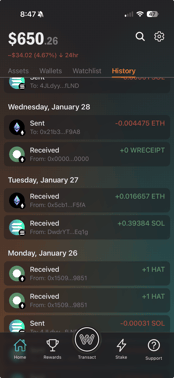
- Open the History tab.
- View pending, confirmed, or failed transactions.
- Tap any transaction to see additional details.
View on a Block Explorer
For additional information, WireUp may provide a link to a blockchain explorer where you can view:
- Confirmation status
- Network fees
- Block number
- Timestamp
- Transaction hash
This is especially useful if a transaction appears delayed or remains pending.
Best Practices
- Double-check wallet addresses before sending.
- Verify the correct blockchain network every time.
- Consider sending a small test transaction before transferring large amounts.
- Keep enough balance available to cover network fees.
- Never send assets to an unsupported blockchain network.